



Yushu Launches Humanoid Robot App Store! Complex Actions Available for Direct Download: One-Click Get Bruce Lee and Twist Dance
On December 13, Unitree Robotics announced a major feature today—the launch of the Humanoid Robot App Store.
The app store includes user square, action library, and other content, allowing users to download various actions and presets, enabling complex operations with one click.

For example, the public beta has already launched three presets: Funny Moves, Twisting Dance, and Bruce Lee.
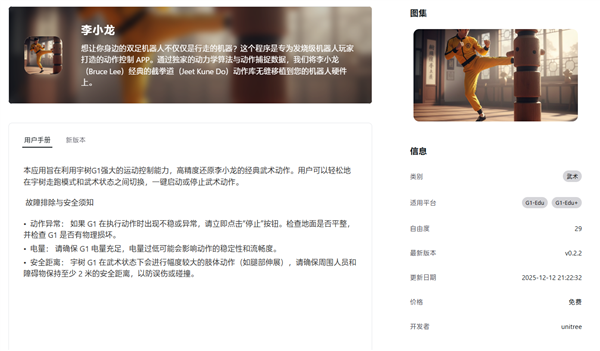
Using "Bruce Lee" as an example, the official introduction is as follows:
This program is a motion control app designed for hardcore robot enthusiasts. Through exclusive dynamics algorithms and motion capture data, we seamlessly integrate Bruce Lee's classic Jeet Kune Do action library into your robot hardware.
This application aims to leverage the powerful motion control capabilities of the Yushu G1 to accurately replicate Bruce Lee's classic martial arts movements. Users can easily switch between walking/running mode and martial arts state, with a one-click start or stop for the martial arts actions.
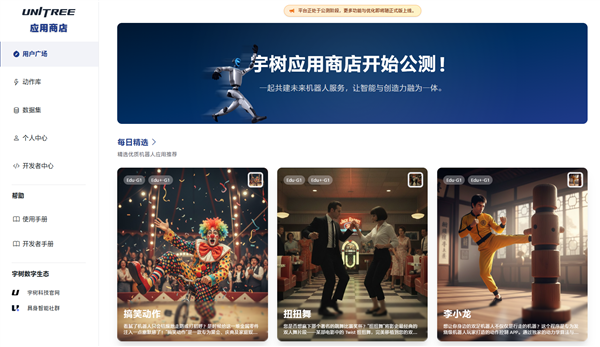
According to the store page, this action is applicable to the G1-Edu and G1-Edu+ platforms. The corresponding robot models can directly download and install it to replicate a set of complex martial arts movements.
Overall, just like people typically install apps on their phones, humanoid robots can also unlock various skills through an app store, making the experience more convenient for everyone.
In the future, with official development and the sharing from other developers and users, a vast database will be established, allowing ordinary users to experience increasingly rich content.
And it can be operated and installed through the mobile app, which is very convenient.
The installation experience process is as follows:
Open the app - Launch the app corresponding to the robot model (Go2/B2/H1, etc.)
Connect the robot - Ensure that the phone and the robot are on the same Wi-Fi network.
Enter Action Library - Click "Function" > "Action Library"
Start installation - Find the acquired action and click the "Install" button on the right.
Waiting for completion - patiently wait for the download and installation process.
Check Action - Confirm Successful Installation in "Local Actions"
【Copyright and Disclaimer】The above information is collected and organized by PlastMatch. The copyright belongs to the original author. This article is reprinted for the purpose of providing more information, and it does not imply that PlastMatch endorses the views expressed in the article or guarantees its accuracy. If there are any errors in the source attribution or if your legitimate rights have been infringed, please contact us, and we will promptly correct or remove the content. If other media, websites, or individuals use the aforementioned content, they must clearly indicate the original source and origin of the work and assume legal responsibility on their own.
Most Popular
-

List Released! Mexico Announces 50% Tariff On 1,371 China Product Categories
-

Nissan Cuts Production of New Leaf EV in Half Due to Battery Shortage
-

New Breakthrough in Domestic Adiponitrile! Observing the Rise of China's Nylon Industry Chain from Tianchen Qixiang's Production
-
Dow, Wanhua, Huntsman Intensively Raise Prices! Who Controls the Global MDI Prices?
-

Clariant Unveils Cost-Cutting Plan Details, Plans to Shut Down Multiple Plants